_____________________________________________________________________________________________________
How to Unlock a Master Account
Master accounts are setup in IPX to allow a participant for which no census data has been pre-loaded to register for a Plan on the platform.
Note: Master Accounts are setup as a special type of individual participant account. The participant ID for these accounts all start with “901”.
An example master login is as follows: Username: RegisterHIDALGTX5013, Password: RegisterMe4179.
If a participant gets the username correct but the password incorrect three times, then TSM will lock this account as if it were an individual user account.
If this happens, then use the following procedure to unlock the master account:
1. Open TSM SmartClient.
2. Navigate to SetupàParticipantsàGeneral Information.
3. Switch the “Search Order” field to “Participant ID”.
4. Enter “901” in the “Search For” field and click the <Search> button.
5. SmartClient will present a list of all Master accounts. The list may be large, spanning a number of search result pages.
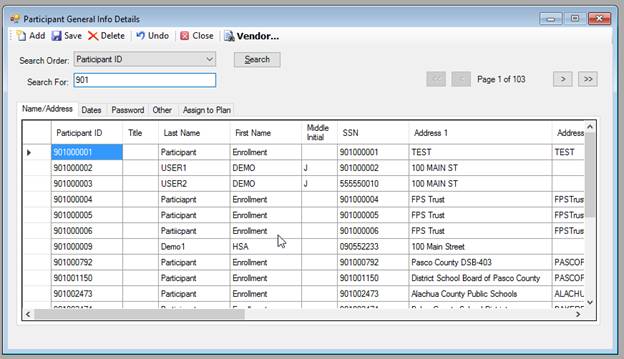
6. Browse the list until you find the master account you’re looking for.
7. Click the “Password” tab.
8. Uncheck the “Locked Out” check box to the right.
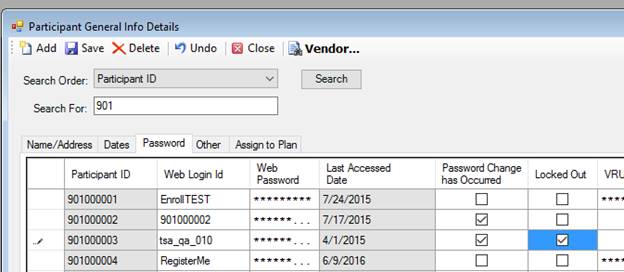
9. Click the Save icon.
10.Attempt to login to IPX under the master account to verify that it has been unlocked.