General Information - Other Tab
Use this window to enter additional participant information regarding marital status, E-mail address, and telephone numbers.
How to Access the Participant General Info Details – Other Tab
1. On the Setup menu, point to Participants and then click General Information. The Participants General Info Details window displays.
2. Click the Other tab.
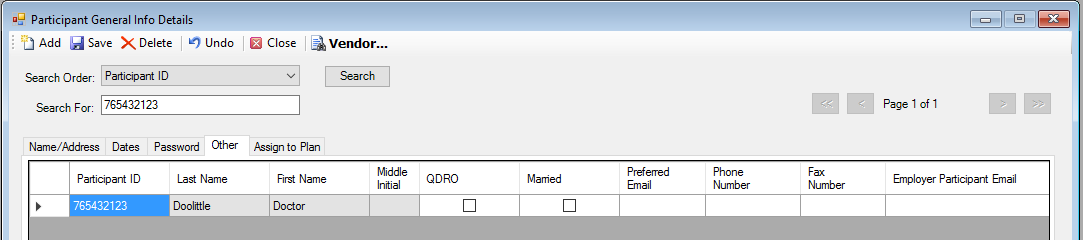
Explanation of Fields
|
Field Name |
Field Description |
Required / Optional |
|
QDRO (Spouse) |
Select this check box if the record is the result of a qualified domestic related order (Alternate Payee). |
Optional |
|
Married |
Select this check box if the participant is married. |
Optional |
|
Preferred Email |
Enter the participant's personal email address. Note: The administrator can update this field on the Plan Sponsor site by selecting the Census Information menu option on the Participant Information Tab and entering the participant's email address. |
Optional |
|
Phone Number |
Enter the participant's home phone number. Note: The administrator can update this field on the Plan Sponsor site by selecting the Census Information menu option on the Participant Information Tab and entering the participant's phone number. |
Optional |
|
Fax Number |
Enter participant's fax number. |
Optional |
|
Employer Participant Email |
Enter the employer email for the participant. |
Optional |