_____________________________________________________________________________________________________________________________
Statement Run
Use the Statement Run option to generate statements, mailing labels, register reports, investment fund and FICA taxable reports by Plan or Participant for a user-defined statement period. You can apply a Run Sort from the list.
How to access this option
On the Statements menu, click Statement Run. The Statement Run window displays.
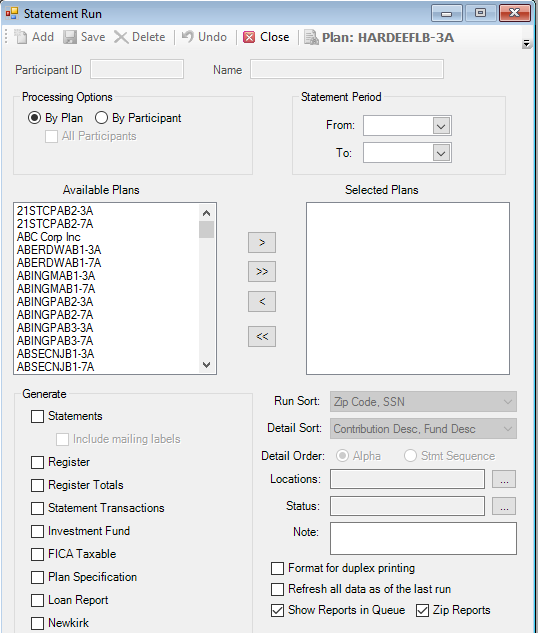

Explanation of Fields:
|
Field Name |
Field Description |
Required / Optional |
|
Processing Options |
Specify whether you want to run the statement By Plan or By Participant. If you select By Plan, highlight the Available Plans you want to use and move them to the Selected Plans list. You can also click to move all plans. If you select By Participant, select the Participant ID from the Search list, or select the All Participants check box to run statements for all participants. |
Required |
|
Statement Period |
Enter the From and To dates for the date range represented by this statement. |
Required |
|
Statements |
Select this check box to generate statements for the selected plan(s) or participant(s). |
Optional |
|
Mailing Labels |
Select this check box to generate mailing labels for the statements. |
Optional |
|
Register |
Select this check box to create a report reflecting financial activity by transaction type on a participant level. This fields works in conjunction with the Detail Sort option. |
Optional |
|
Register Totals |
Select this check box to create a report summarizing financial activity by fund, by transaction type for a plan or individual participant for the statement period date range. Select the Detail Sort to define the data reflected on this report. |
Optional |
|
Statement Transactions |
Select this check box to create a report that displays detailed transactional activity by investment fund for any transaction processed during the selected statement period on a participant or plan level. |
Optional |
|
Investment Fund |
Select this check box to create a report on a plan level reflecting fund balances by transaction type for the selected statement period. |
Optional |
|
FICA Taxable |
Select this check box to create a report reflecting the taxable earnings for the participant for the selected statement period. |
Optional |
|
Plan Specification |
Select this check box to create a report that displays the specifications of the Plan, such as, Plan Information, Plan Eligibility, Plan Loan Provisions, Plan Contact, Plan Vesting Schedule, and Funds being Used in Plan. |
Optional |
|
Loan Report |
Select this check box to create a report by Plan and participant that displays the details of any outstanding loans. |
Optional |
|
NewKirk |
Not currently used. Please do NOT select this option. |
|
|
Fee Disclosure Statement |
Not currently used. Please do NOT select this option. |
|
|
Run Sort |
Select the order in which the statements will be processed, for example, by Zip Code, SSN. |
Optional Available only for Statements and Register Reports |
|
Detail Sort |
Select the sort order. There are several options to choose from. |
Optional Available only for Register and Register Total Reports |
|
Detail Order |
Select the order in which the details are displayed: Alphabetically (Alpha) or by Statement Sequence (Stmt Sequence). |
Optional Available only for Register and Register Total Reports |
|
Locations |
Select the locations for which you want to generate statements or reports. If no location is selected, TSM SmartClient uses all locations. |
Optional |
|
Status |
Select the statuses of the transactions you want to include on the statements. If no status is selected, TSM SmartClient includes all statuses. |
Optional |
|
Note |
Use the Note feature to display a message at the bottom of a participant's statement. The message will appear on the last page of each participant's basic statement. |
Optional |
|
Format for Duplex Printing |
Select this check box to format the statements for duplex printing. TSM SmartClient will insert a "This page intentionally left blank" page if the number of pages for an individual statement ends on an odd number. This assures that the beginning of the next statement begins on page #1. For example, the following participant's statement totaled (3) pages. TSM SmartClient automatically produced a blank page (page #4). The beginning of the next statement will revert back to page one. This is a useful feature when clients need to print and sort their statements prior to distribution. Your printer will need to be configured to utilize this feature. |
Optional |
|
Refresh all data as of the last run |
Select this check box to update the statement or report file if participant data was revised since the first statement date range file was created. |
Optional |
|
Include only Paper Statement recipients |
Select this check box to generate statements for paper statement recipients only. |
Optional |